Version 2.0 · Commodore 64 Ultimate

A modern desktop for the Commodore 64.

Cult64 is a graphical operating system built from the ground up for the Commodore 64 Ultimate. Windows you can move and resize, drop-down menus, a mouse pointer, desktop icons and nine applications — running entirely from the C64U's SD card.

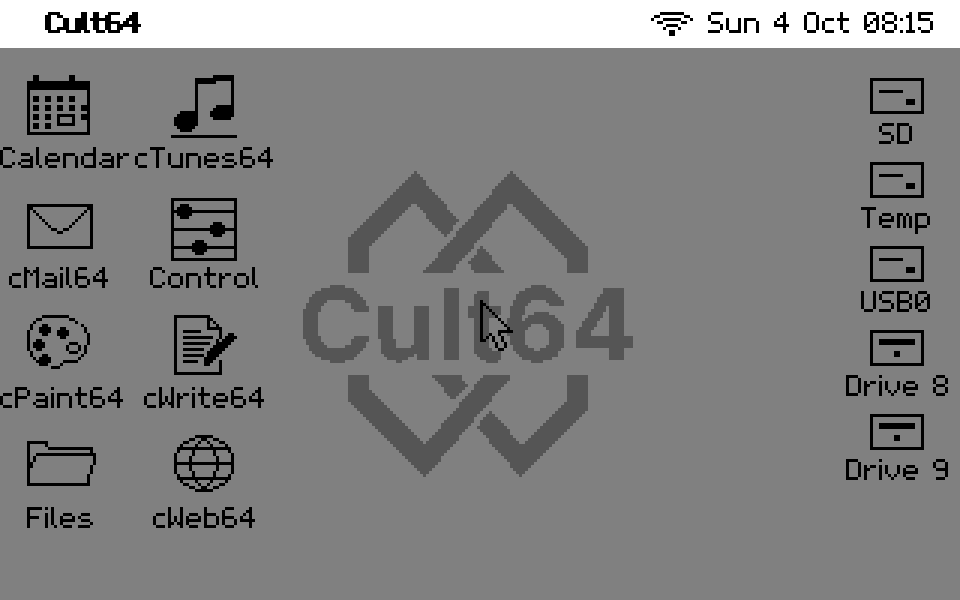
The Cult64 desktop: a menu bar with the Wi-Fi symbol and the date and time, application icons on the left, drive icons on the right and the Cult64 emblem in the middle.
64 MHzturbo, used throughout
16 MBREU for apps and data
9built-in applications
6510assembly, from scratch
SD cardruns entirely from it
See it running

The demo video

Thank you to everyone who has watched, shared and commented. Many of your questions are answered in the FAQ below.

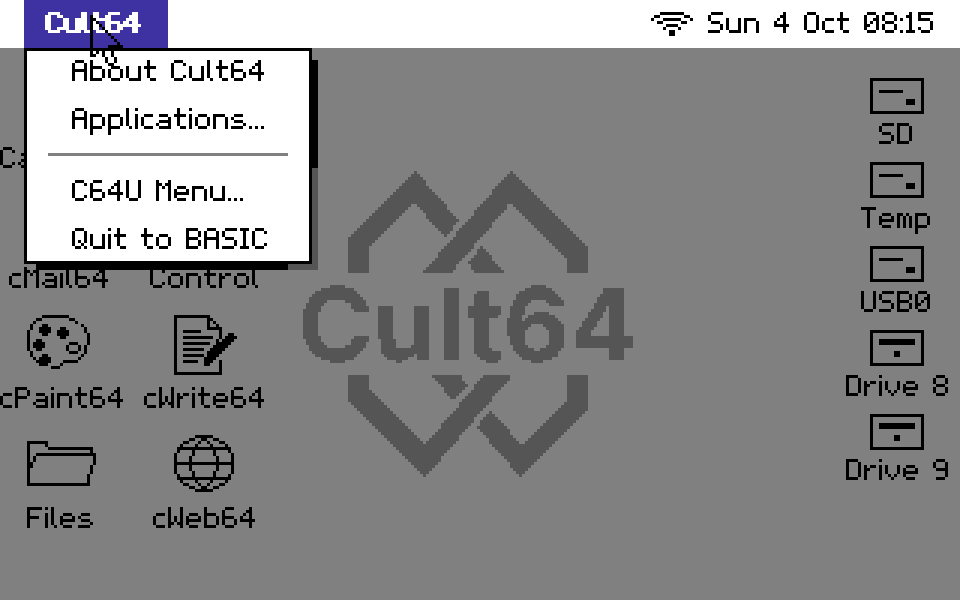
The Cult64 desktop with the Cult64 menu open
Cult64 demo on YouTube

Prefer YouTube? Watch it on YouTube to like, comment and subscribe.

The system

Everything you expect from a desktop

Cult64 doesn't sit on top of GEOS or another system. It is its own operating system, written for one machine, and it uses what the C64 Ultimate can do that a stock C64 cannot.

🪟

Real windows

Close, roll up and zoom buttons, drag to move, drag the corner to resize. Up to six windows open at once.

🖱️

Mouse first

A 1351-style mouse in port 1 (a USB mouse through an adapter works), scroll-wheel support, right-click pop-up menus. A joystick in port 2 works too.

📶

Connected to the machine

The menu bar shows live Wi-Fi status and the C64U's clock. The Control Panel reads the network and drives, and opens the C64U's own menu.

💾

SD, USB and disk images

Browse the SD card, USB sticks and D64/D71/D81 images, copy and move files, mount images in drives 8 and 9, and run programs and games.

🖨️

Files that travel

cWrite64 saves RTF that Word and Pages open, cCalc64 exports CSV, and every application can print to PDF on the SD card.

🎵

Sound and polish

A start-up chime, subtle SID system sounds, a screen saver, desktop shortcuts, a shared clipboard and colour themes.

Applications

Nine applications, one desktop

Click any screenshot to see it full size. Screenshots come from the Cult64 simulator and match what you see on the C64 Ultimate. Offline works on its own; Bridge needs the Cult64 bridge.

File Manager Offline

SD card, USB, disk images and the Trash. Copy, move, rename, Get Info, and run programs. Dropbox appears here with the bridge.

cWrite64 Offline

A word processor with three typefaces in seven sizes, styles, colours, a ruler, tabs, page breaks, headers and footers.

cPaint64 Offline

Hires 320 × 200 painting in the spirit of GEOPAINT, an icon editor, and export of any picture as a stand-alone C64 program.

cCalc64 Offline

A spreadsheet of 64 × 256 cells with formulas, dates, sorting and bar and line charts. Decimal maths, so 0.1 + 0.2 is exactly 0.3.

Calendar Offline

Month, week and day views with notes, from the C64U's own clock.

Control Panel Offline

Colours, date and time, network status, drives 8 and 9, screen saver and sound.

cMail64 Bridge

Real email from your own mail account: inbox, read, reply, send, attachments and print to PDF.

cWeb64 Bridge

A web browser with headings, links, bookmarks and pictures, plus a built-in chat with Claude.

cTunes64 Mostly bridge

SID music that keeps playing in the background while you work, on the SID chip or through Ultimate Audio.

Offline & online

Fully usable offline. Even better connected.

Some things are beyond any 8-bit machine: modern mail servers and websites need encryption (TLS), and photos are far too big to convert on a 6510. For those, Cult64 can hand the heavy lifting to the Cult64 bridge, a small Python program on a computer on your home network. Without it, the core system is complete on its own.

On its own — no network needed

  • The desktop, windows, menus, shortcuts and screen saver
  • File Manager for SD, USB and disk images
  • cWrite64, cPaint64, cCalc64, including Print to PDF
  • Calendar and Control Panel
  • Running your programs and games
  • Tunes played once through the bridge are kept and play again offline

With the Cult64 bridge

  • cMail64 email and cWeb64 browsing over TLS
  • Ask Claude in cWrite64, cMail64, cWeb64 and cCalc64
  • Photos (JPG, PNG, HEIC…) converted into cPaint64 pictures
  • cTunes64 background SID music
  • Dropbox in the File Manager and Share by Email
  • Game Mode for games that need the C64U's factory settings
Your passwords never touch the C64. Mail passwords and API keys stay in the bridge computer's Keychain. If the bridge is off, the features that need it simply say "Can't reach the bridge" — nothing else is affected and nothing is lost.
Innovations

What the bridge makes possible

The bridge isn't just a TLS proxy. It lets a 40-year-old architecture work with today's services — while the C64 stays in charge of the desktop, the windows and your files.

Ask Claude, built into the system

Select text in cWrite64, cMail64 or cWeb64 and press C= K: proofread, summarize, make it shorter or clearer, change the tone, or translate between English and Canadian French. Proofread lists every correction and Accept All makes them in place, so your fonts and styles stay as they were. In cCalc64, Claude can summarize the figures, explain the formulas or look for mistakes, such as a total that leaves out a row. Nothing changes until you choose.

Dropbox as a drive

Your Dropbox appears in the File Manager beside the SD card and USB sticks. Open folders, double-click a file to bring it to the C64, copy and paste in either direction at network speed, rename, make folders and move to the Trash. Long or accented file names are shortened for the C64, and the bridge still finds the real file.

Photos into C64 pictures

JPG, PNG, GIF, BMP and HEIC photos open in cPaint64. The bridge turns them upright, fits them to 320 × 200 and picks two C64 colours for each 8 × 8 cell, dithered for photos and flat for drawings — in a few seconds.

SID music while you work

The bridge relocates each tune by running it on an emulated 6502, then checks frame by frame that it still writes the same to the SID. Tunes too big for that are turned into sound and played through Ultimate Audio from the REU, taking no time from the 6510.

Game Mode

Some games need the C64U's factory settings. Game Mode switches the machine to a saved games profile, restarts it and starts the game; load the OS profile again and the bridge brings Cult64 back by itself.

Share by Email

Send any file from the File Manager as an ordinary attachment, up to 25 MB: PDF printouts, documents, pictures, even .prg and .d64 files — the easiest way to get your work onto a Mac or phone.

Real email, securely

cMail64 reads and sends from your own mail account. The bridge handles the IMAP and SMTP encryption and turns messages, HTML included, into text the C64 can show.

The web, reformatted

cWeb64 asks the bridge for a page, which comes back as formatted text with headings, bold, lists, links and pictures. Type words instead of an address to search the web, or start with ? to ask Claude.

How it was made

Vibe-coded with Claude

Cult64 was built in conversation with Claude, Anthropic's AI model. Rather than writing every line of 6510 assembly myself, I described what I wanted, made the design decisions, and tested each build on my own C64 Ultimate. Claude wrote the code.

That code is real 6510 assembly, built with cc65: the kernel, the graphics and font engine, the window and menu managers, the drivers for the Ultimate Command Interface, and every application. Claude also wrote the Python bridge and a simulator that runs Cult64 on an emulated 6502 so features can be tested before they reach the machine.

The result went from a blank folder to version 1.0 in early October 2026, and to version 2.0 eleven days later. It is honest proof of what one enthusiast and an AI collaborator can build together — and I wanted to be open about that.

Me

Vision, decisions and testing

What Cult64 should look and feel like, which features matter, how the menus work, and every test run on the real C64 Ultimate.

Claude

Code, documentation and tests

6510 assembly for the system and applications, the Python bridge, the simulator and test scenarios, and the user manual.

Inside Cult64

Ask Claude

Claude is also a feature: proofread, summarize, rewrite, change tone or translate (English ⇄ Canadian French) text in your documents, or check a spreadsheet for mistakes — with a review window before anything changes.

What you need

Requirements

  • 1A Commodore 64 Ultimate with Commodore's firmware 1.1.0 or later.
  • 2The REU turned on in the C64U's menu and set to 16 MB.
  • 3A mouse in control port 1 — a Commodore 1351 or compatible (a USB mouse through a 1351 adapter is fine). A joystick in port 2 also works.
  • 4The internal SD card (or a USB stick) for Cult64 and your files.
  • 5Optional: Wi-Fi or Ethernet, and a Mac running the Cult64 bridge, for the online features.
Release history

Versions

2.017 October 2026

Ask Claude everywhere: proofread, summarize, rewrite, change tone and translate, with a review window. cCalc64 spreadsheet with charts.

1.212 October 2026

cTunes64 background SID music, Ultimate Audio playback, copy from web pages, text in cPaint64, a reworked Cult64 menu.

1.16 October 2026

Ask Claude chat in cWeb64.

1.06 October 2026

The desktop, File Manager, Control Panel, Calendar, cWrite64, cPaint64, cMail64 and cWeb64, running entirely from the SD card.

Questions from the comments

Frequently asked questions

Will Cult64 run on an original Commodore 64, a C64C or a C128?

No, not as it stands. Cult64 was designed around abilities a classic C64 doesn't have:

  • Speed. Cult64 runs the CPU at 64 MHz. Drawing the full desktop takes about 22 ms at that speed — on a stock 1 MHz C64 the same redraw would take well over a second, every time.
  • Memory. Applications, fonts, the clipboard, undo and music all live in a 16 MB REU.
  • The Ultimate Command Interface. Cult64 reads and writes the SD card and USB sticks, checks the network, reads the clock and controls the drives through it.
  • Ultimate Audio, for larger tunes in cTunes64.

A cartridge such as a 1541 Ultimate II+ adds some of these (an REU and the Command Interface), but it doesn't make the 6510 any faster, so the experience would be far too slow. I'd rather build something great for one machine than something compromised for all of them.

What about Gideon's Ultimate 64 boards (Ultimate 64 Elite / Elite II)?

The C64 Ultimate is built on the same Ultimate technology, so these are Cult64's closest relatives. They are untested, though. Cult64 is developed and tested only on a C64 Ultimate with Commodore's official firmware, and differences in firmware, menus or settings could stop parts of it from working. If that changes, it will be announced here.

Does it run in VICE, on THEC64 or the THEC64 Mini?

No. Those emulate a classic C64, without the Ultimate Command Interface, the 64 MHz turbo or the C64U's drives and network, which Cult64 depends on. (I test with Cult64's own simulator during development, but it isn't a general-purpose emulator.)

Can I download Cult64?

Not yet. Cult64 started as a personal project, built for my own C64 Ultimate. The response to the video has been wonderful, and a public, open-source release is something I'm considering. The best way to hear about it is to subscribe on YouTube — any news will also be posted here. I'll also be looking for a small group of volunteer testers soon; see Join the Cult64 test group.

Is Cult64 based on GEOS or C64 OS? Can it run GEOS applications?

Neither. Cult64 is written from scratch and shares no code with GEOS, C64 OS or any other system, and it doesn't run their applications. I've used and enjoyed them all; GEOS's clean bitmap look was an inspiration, and cPaint64 is a nod to GEOPAINT.

Do I need the internet, or a Mac?

No. The desktop, File Manager, cWrite64, cPaint64, cCalc64, Calendar, Control Panel and running programs all work with no network at all. Plenty of Commodore fans prefer an offline machine, and Cult64 is complete that way.

The online features (mail, web, Ask Claude, photos, Dropbox, cTunes64, Game Mode) need the Cult64 bridge on a computer on your home network. Mine runs on an old Mac Mini; it's written in Python, but it currently uses some macOS features such as the Keychain.

Why does it need a "bridge" for email and the web?

Today's mail servers and websites require TLS encryption, which is far beyond what a 6510 can do in reasonable time. The bridge signs in to your mail server, fetches web pages over HTTPS and converts them into something the C64 can display. The C64 talks to it over your home network.

Does Claude run on the Commodore 64?

No — the C64 sends your selected text to the bridge, which passes it to Anthropic's API and sends the answer back. It uses your own Anthropic API key, kept on the bridge computer and billed by use, separately from a claude.ai subscription. Nothing in your document changes until you choose Replace, Insert or Accept All.

Can I still play my games?

Yes. Double-click a program, or right-click a disk image and choose Run: Cult64 closes and the C64 starts the program on a freshly reset machine, so it sees exactly what it expects. Some games (Aliens and Elite, for example) need the C64U's factory settings; Game Mode switches the C64U to a saved games profile, starts the game, and brings Cult64 back afterwards.

What mouse do I need? Does a joystick work?

A Commodore 1351 or compatible mouse in control port 1 — I use a USB mouse through a 1351 adapter. A Micromys-style scroll wheel scrolls windows. A joystick in port 2 also moves the pointer, with fire as the button.

Does it work on every edition of the C64 Ultimate, and on NTSC?

Cult64 needs Commodore's firmware 1.1.0 or later. It was developed on a PAL Starlight Edition; other editions share the same hardware, but NTSC machines haven't been tested yet.

Can I open my files on a modern computer?

Yes. cWrite64 saves RTF files that Word, Pages and TextEdit open with their formatting; cCalc64 exports CSV for Excel, Numbers and Google Sheets; and Print to PDF works in every document application. Take the SD card to your computer, or with the bridge, email the file to yourself or put it in Dropbox.

Can I print directly to a Wi-Fi or USB printer?

Not yet — for now, printing means printing to a file. Print to PDF in cWrite64, cPaint64, cCalc64 and cMail64 makes a PDF in the Cult64/Printouts folder on the SD card, laid out exactly as on the screen, with its fonts, headers and footers. From there you can print it from any computer or phone: take the SD card across, or, with the bridge, email it to yourself with Share by Email or put it in Dropbox.

Printing straight to a modern printer is more complex than it looks. Today's Wi-Fi and USB printers expect a full page description in their own language, prepared by a driver, at a resolution many times that of the C64's screen. I haven't attempted it yet, but it's a fair question and I've noted the interest.

Get involved

Join the Cult64 test group

In the near future I'll be looking for a small group of volunteers to test Cult64 on their own C64 Ultimates. If you'd like to be part of the test group, send an email with your contact information to Cult64@faubert.net.

✉ Cult64@faubert.net